Client Preview: Shareable Stone Pages
Client Preview turns a finished design into a private, branded web page you can send to a buyer — a clean lineup of your stones with your business name and logo, no login required for the person you share it with.
What it is
A Client Preview is a link, like client-preview/…, that opens a viewer-friendly page showing up to four gems. Each gem can carry a rough shot, a rendered image, a short animation, and its specs (L:W ratio, dimensions, weight, shape, and price). The page wears your branding, not the Gem Diagram interface — the person you send it to sees your studio, and the footer marks it as a private render preview, not for distribution.
Client Preview is a Pro feature. See Accounts, Plans & Billing for what each plan includes.
When you'd use it
You've designed and rendered a stone (or several) and want to show a client what they'd be buying — before you cut, or to present finished work. Instead of emailing loose screenshots, you send one branded link that presents every stone at a consistent quality with the numbers that matter.
How it fits together
Client Preview has three parts, each covered in its own article:
- You set your studio branding once — business name, logo, and the color theme every link uses. See Branding & Theme.
- You stage gems and capture their images, then generate a link. See Creating & Managing Links.
- Your client opens the link in any browser and browses the stones. No account needed.
What the recipient sees
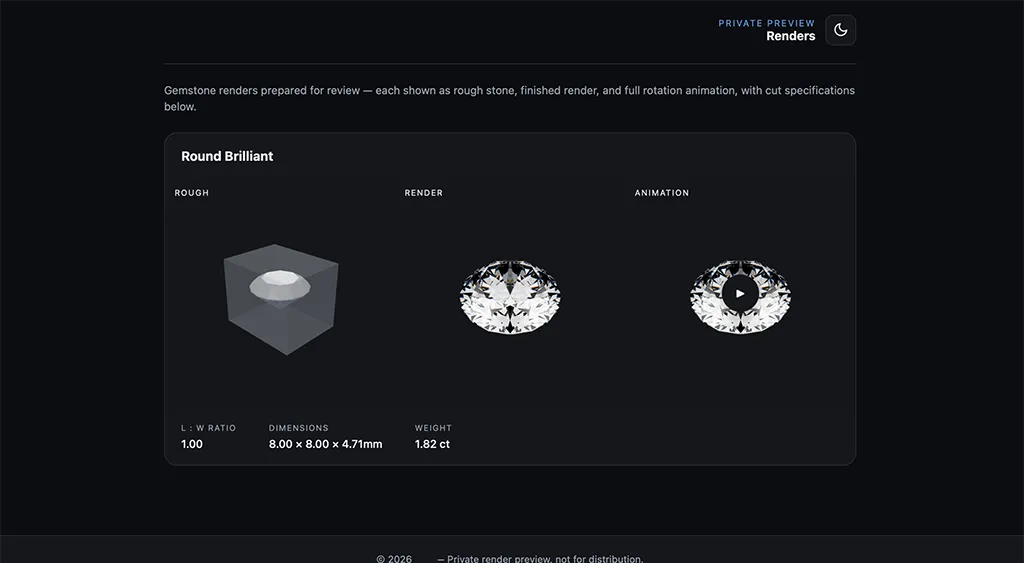
The preview page shows your logo and business name at the top, a "Private Preview Renders" heading, and a card for each staged gem. Every card can display three views — labeled Rough, Render, and Animation — plus a specs panel. A sun/moon control lets the visitor switch between light and dark for their own viewing; it doesn't change what anyone else sees or your saved default.
Note
The preview is read-only. Clients can look, switch views, and read specs, but they can't edit the design or download your source files.
To set up your branding first, continue to Branding & Theme.