Choosing a Material
The material you pick for a design feeds three things at once: how the stone renders in Realistic mode, the numbers in the stat tiles and stone report, and (for two materials) a fixed body color you can't override. Picking the right one matters even before you touch the color picker.
Note
Every material below is available on both plans, including the Free Demo. The Free Demo renders in transparent color (not editable); color editing requires the Pro plan — see Accounts, Plans & Billing.
The material dropdown
Open the Material card in the Inspect panel (right side of the Developer) and use the Material dropdown. It's ordered by refractive index, highest first — Moissanite and Rutile at the top, Fluorite at the bottom. Choosing a material immediately updates three things below it:
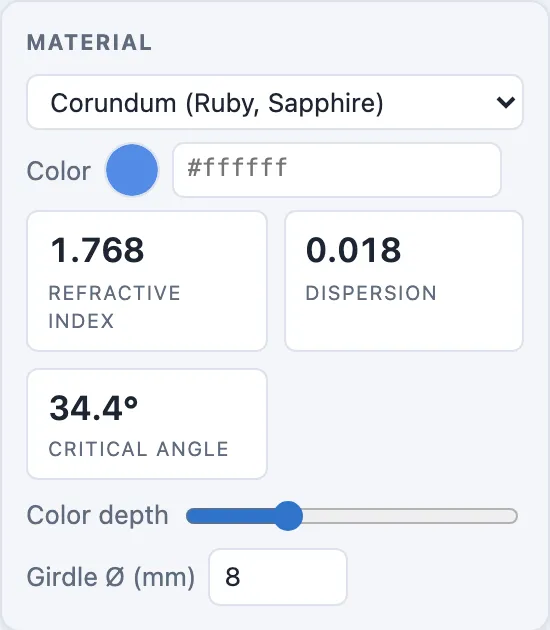
- The Refractive index, Dispersion, and Critical angle stat tiles, read straight from the material's data.
- The Realistic-mode shader's index of refraction and chromatic spread (see Refractive Index & Dispersion).
- The body-color picker, for the two materials that supply their own color — see Pleochroism (Alexandrite) and Opal's Play of Color.
Reference table
Every built-in material, in dropdown order (refractive index, highest first):
| Material | RI | Dispersion | Critical angle | Specific gravity | Mohs hardness |
|---|---|---|---|---|---|
| Moissanite | 2.650 | 0.104 | 22.2° | 3.21 | 9.25 |
| Rutile | 2.620 | 0.280 | 22.4° | 4.25 | 6–6.5 |
| Diamond | 2.417 | 0.044 | 24.4° | 3.52 | 10 |
| Cubic Zirconia | 2.160 | 0.060 | 27.6° | 5.80 | 8.5 |
| Zircon | 1.930 | 0.039 | 31.2° | 4.68 | 7.5 |
| Garnet (Demantoid) | 1.880 | 0.057 | 32.1° | 3.84 | 6.5–7 |
| YAG (Yb:YAG) | 1.833 | 0.028 | 33.1° | 4.56 | 8.25 |
| Garnet (Almandine, Spessartine) | 1.790 | 0.025 | 34.0° | 4.10 | 7–7.5 |
| Corundum (Ruby, Sapphire) | 1.768 | 0.018 | 34.4° | 4.00 | 9 |
| Garnet (Rhodolite) | 1.760 | 0.026 | 34.6° | 3.84 | 7–7.5 |
| Chrysoberyl (Alexandrite) — pleochroic | 1.746 | 0.015 | 34.9° | 3.73 | 8.5 |
| Garnet (Tsavorite, Hessonite) | 1.745 | 0.027 | 35.0° | 3.63 | 7–7.5 |
| Spinel | 1.720 | 0.020 | 35.5° | 3.60 | 7.5–8 |
| Tanzanite | 1.690 | 0.030 | 36.3° | 3.35 | 6.5–7 |
| Peridot | 1.654 | 0.020 | 37.2° | 3.34 | 6.5–7 |
| Tourmaline | 1.640 | 0.017 | 37.6° | 3.06 | 7–7.5 |
| Topaz | 1.620 | 0.014 | 38.1° | 3.53 | 8 |
| Beryl (Emerald, Aquamarine) | 1.580 | 0.014 | 39.3° | 2.70 | 7.5–8 |
| Quartz (Amethyst, Citrine) | 1.550 | 0.013 | 40.2° | 2.65 | 7 |
| Glass | 1.520 | 0.010 | 41.1° | 2.50 | 5.5 |
| Opal — play of color | 1.450 | 0.000 | 43.6° | 2.15 | 5.5–6.5 |
| Fluorite | 1.434 | 0.007 | 44.2° | 3.18 | 4 |
Note
Mohs hardness is informational only — it doesn't feed the renderer or the report. It's there to help you judge whether a cutting plan is realistic for the actual stone you're working from.
Custom RI
When none of the built-in materials matches the stone you're cutting, choose Custom from the bottom of the Material dropdown and type a refractive index into the Custom RI field that appears in the Material card. Any value from 1.2 to 3.5 is accepted, to three decimal places (for example, 1.540). The dropdown option then reads "Custom (1.540)" and the renderer, stat tiles, and report all use your entered RI.
Custom RI sets the refractive index only — the other optical properties fall back to a nearby built-in material's values, so a custom stone still fires and refracts realistically. Custom RI is included in the Pro plan, alongside the full material list.
Importing a design with a non-standard material
.gcs/.asc/.gem files carry their own refractive index rather than a
material name. If that RI doesn't land exactly on one of the table above,
Gem Diagram keeps the imported value as a Custom RI and snaps the dropdown
to the closest built-in material by refractive index for its remaining
optical data — so the stat tiles and report still have a material to read from,
and the exact imported RI isn't lost. A brand-new design with no RI at all
defaults to Corundum (Ruby, Sapphire).
Tip
If an imported stone renders with the wrong dispersion or critical angle, check which material the dropdown landed on after import — the snap is nearest-RI, not name-based, so an unusual RI can land on a material you didn't expect.